Meltdown & Spectre
Meltdown, or CVE-2017-5754 as it is formally known, is a hardware vulnerability which allows for unauthorised access to privileged memory which affects Intel processors. It is commonly paired with a similar vulnerability called Spectre (CVE-2017-5753, CVE-2017-5753) which affects a large range of x86 processors.
The vulnerability website can be found here, which includes proof of concept and further details on the underlying issue.
Describing what the vulnerability is, what it does, and how it came about is better left to the above link, this page is aimed at people wanting to patch their way to safety.
The good news is that by the time you're reading this, all the major Linux distributions will have patches available for their various kernels, so it's simply a matter or running an update through your package manager and restarting your server.
First things first though, let's check if you're actually vulnerable.
Checking vulnerability
Windows
Windows Server is patched using the following security updates:
- KB4056897 for Windows Server 2008R2
- KB4056898 for Windows Server 2012R2
- KB4056890 for Windows Server 2016
These security updates can be applied manually, or will be applied during your next update.
You can visit our Windows specific page for further patching steps here Protecting against Meltdown and Spectre in Windows.
Linux
Checking for the vulnerability requires comparing the kernel version against the patched kernel version. You can check your kernel version by running the command below:
uname -a
This will return something like:
 root@dev:~# uname -a
 Linux dev 3.13.0-76-generic #120-Ubuntu SMP Mon Jan 18 15:59:10 UTC 2016 x86_64 x86_64 x86_64 GNU/Linux
If your kernel version is earlier (lower) than the following list, you're vulnerable and should follow the next section to update your kernel to safe version.
- 3.10.0-693.11.6 for RHEL/CentOS 7
- 2.6.32-696.18.7 for RHEL/CentOS 6
- To Be Defined for RHEL/CentOS 5
- To Be Defined for Ubuntu 16.04 LTS
- To Be Defined for Ubuntu 14.04 LTS
- To Be Defined for Ubuntu 12.04 LTS
- 4.9.65-3+deb9u2 for Debian 9
- To Be Defined for Debian 8
- To Be Defined for Debian 7
Patching the vulnerability
ANS customers
If you're a Linux customer of ANS, we've implemented an easy patching process through ANS Glass. Alternatively you could also follow the Non-ANS customers process set out below.
Once you're logged into ANS Glass you will see something like this:
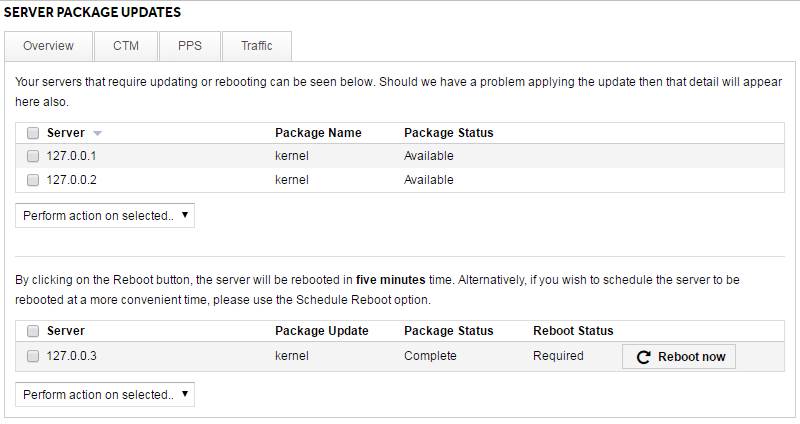
Select all the servers you want to patch, select Update selected packages from the dropdown menu underneath and then press GO to start the update process.
This process should take a few minutes, but we're not out of the woods yet. Refresh the page in a few minutes time and you should now see the following section has appeared, showing that there are servers that need rebooting to utilise the patch you just applied:
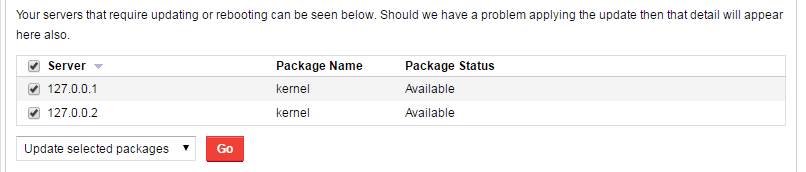
Again, select the servers you want to restart, and select either Reboot selected now or Reboot selected at set time from the dropdown. If you're doing it at a set time, enter a time, then hit Schedule Reboot to get it all under way.
Once your servers are back online, you're good to go.
Non-ANS customers
As mentioned previously, there should be a patch available for your kernel version through your standard package manager now.
CentOS/Red Hat
yum is the package manager at play here, so you can update the kernel with the following command:
yum update kernel
Alternatively, if you'd like to update all packages on your server, you can use:
yum update
After this has completed, you'll need to reboot your server to load the new kernel:
reboot
Ubuntu/Debian
With Debian based systems, your package manager is aptitude, but we'll use apt-get here. Run the following to upgrade your packages:
apt-get update && apt-get dist-upgrade
As with CentOS, a reboot is needed to use this new kernel:
reboot