SSLs
SSLs are used to encrypt traffic between the load balancer and the target servers. You can use an SSL certificate you have bought from ANS or an SSL from elsewhere.
To add your SSL certificates, first go to the listener you want to add the certificate to. Then click SSLs on the tabs at the top of the screen, followed by Create SSL.
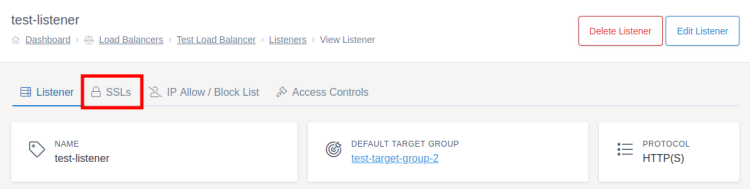
You first need to give your SSL certificate a name to help you identify the SSL later.
Using an ANS SSL
If you want to use an SSL certificate bought from ANS, click Import ANS Certificate highlighted in red on the below screenshot. You can then search for and choose the SSL certificate using the dropdown menu highlighted in blue below.
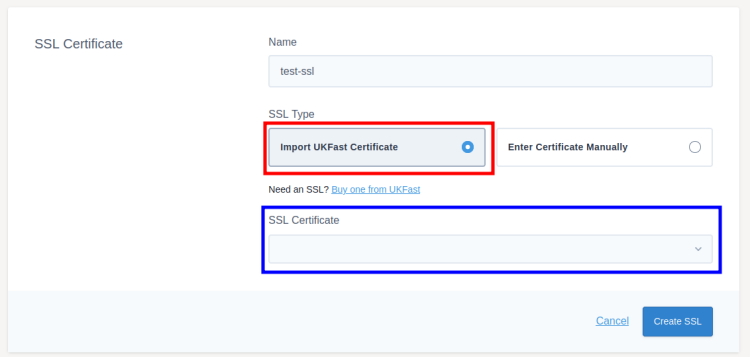
If you can't find the SSL certificate you are looking for, make sure it hasn't expired in the SSL section of ANS Glass.
Using an SSL from elsewhere
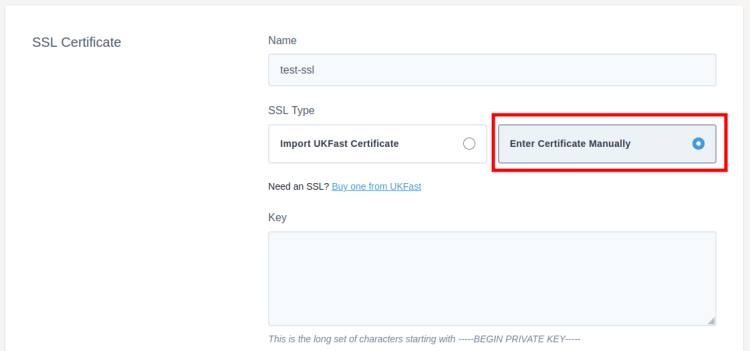
If you're using an SSL not from ANS, such as Let's Encrypt or a certificate bought from another provider, you will need to provide the details yourself.
Click Enter Certificate Manually, then copy the details you have been given into the appropriate certificate, key, and CA bundle fields. CA bundle is an optional field and not all SSL certificates will have one.
Saving and deploying
Click Create SSL to add the SSL to the listener
Once SSLs have been created, for security, you'll only be able to edit the name of the certificate. If you need to change any other values (such as the key) you should delete the SSL from ANS Glass and re-add it with the new details.
Once you've set up the SSLs you need on a listener, make sure you deploy your changes.